
Apple's New Apple TV 4K Has Everything Except What Audiophiles Wanted
Apple's new Apple TV 4K brings AI, faster performance, and expanded HomePod surround sound, but few improvements for movie enthusiasts. After upgrading every generation, here's why I'm skipping this one and exploring alternatives like Kaleidescape.
Apple's latest streaming box brings more power, artificial intelligence, and an intriguing new HomePod surround sound system. But after upgrading through every Apple TV generation, this is the first one I'm choosing to skip. Here's why.
I've owned an Apple TV since the very first generation. Every time Apple introduced a new model, I upgraded, always choosing the highest-specification version available.
Until now.
Apple's fourth-generation Apple TV 4K, announced October 13, 2026, arrives with a faster A19 processor, enhanced artificial intelligence, improved gaming performance, and an interesting new four-HomePod surround sound system.
It also comes with a $299 price tag, considerably higher than the previous generation's original $129 starting price.
Yet for those of us who primarily use Apple TV to watch movies and television, the improvements to fundamental video playback capabilities are surprisingly limited.
And one feature home theater enthusiasts have requested for years remains absent: native passthrough for lossless movie soundtracks.
For the first time, I have no intention of ordering Apple's newest streaming box.
Not because I think it's a bad product. In fact, there are aspects of this release that I genuinely appreciate.
But the features Apple has prioritized don't address what matters most to me when I sit down to watch a movie.
So what has actually changed, who should consider upgrading, and could your money be better spent elsewhere?
What's Actually New With Apple TV 4K?
Let's start with the improvements.
Apple's A19 processor delivers up to 50% faster CPU performance and twice the GPU performance of the previous generation, according to the company.
That's a substantial increase in processing capability.
It should provide faster navigation, smoother animations, and additional performance for gaming and future applications.
Apple has also introduced dedicated AV1 hardware decoding.
AV1 is a modern video compression format designed to deliver high-quality video more efficiently than older codecs. Depending on how a streaming service implements it, AV1 can help maintain picture quality while reducing bandwidth requirements or provide improved quality at a comparable bitrate.
That's a legitimate benefit, particularly as AV1 adoption expands.
The new model also includes three far-field microphones for hands-free Siri interaction, expanded smart home functionality, and an updated Siri Remote featuring Precision Finding and an audible locating function.
Then there's Siri AI.
Apple's redesigned voice assistant promises more conversational searches, contextual questions about movies and television shows, and deeper integration with Apple's broader ecosystem.
For someone who uses Apple TV as a gaming platform, relies heavily on Siri, or wants a more integrated smart home experience, these improvements could be compelling.
But that's not how I use my Apple TV.
I don't use it for gaming, and while I appreciate artificial intelligence, I don't particularly need a more conversational assistant when I'm watching television.
I want to choose a movie, sit down, and enjoy it with the best possible picture and sound.
And from that perspective, the new Apple TV doesn't offer a particularly compelling reason to replace my existing model.
Video Quality: How Much Has Really Changed?
This is where Apple's announcement becomes especially interesting.
The third-generation Apple TV 4K, released in 2022, already supports most of the video technologies that matter for conventional movie streaming.
We're talking about 4K resolution at up to 60 frames per second, Dolby Vision, HDR10, HDR10+, and HLG.
It also supports HDMI Quick Media Switching, which can reduce the temporary black screens that sometimes occur when switching between video frame rates on compatible displays.
Now compare that with the new fourth-generation model.
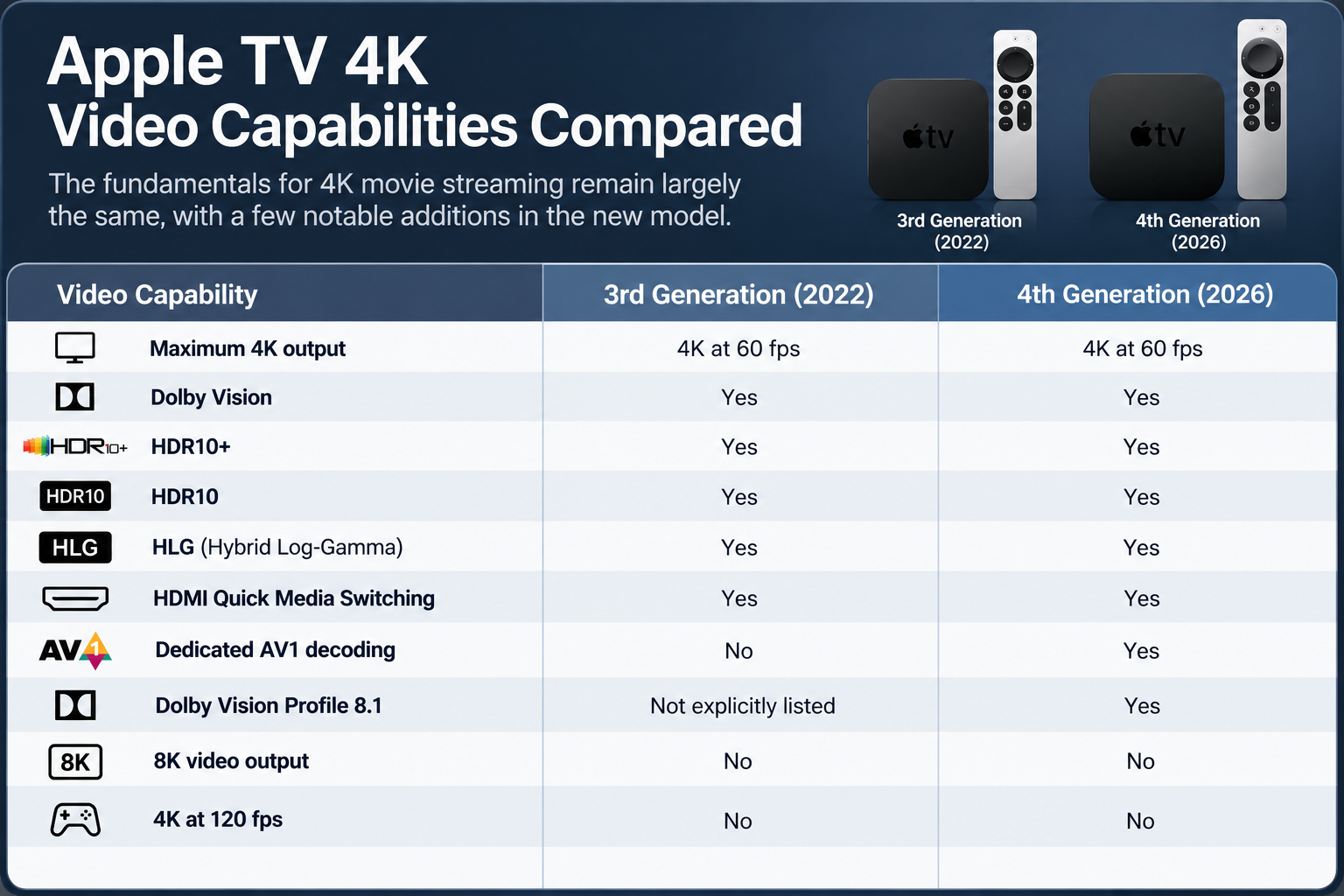
There are improvements, particularly AV1 decoding and Apple's newly listed support for Dolby Vision Profile 8.1.
But the fundamental output capabilities remain largely unchanged.
Both generations support 4K video at up to 60 frames per second. Both support Dolby Vision and HDR10+. Neither offers 8K output or 4K at 120 frames per second.
That doesn't mean 8K or 120 fps would necessarily improve conventional movie watching. Most films don't require either.
But it illustrates just how similar the two devices remain in the areas most relevant to traditional streaming.
If you're watching the same Dolby Vision movie through the same application on the same television, there's no reason to assume the A19 processor alone will deliver a dramatically better picture.
A faster processor doesn't automatically produce better contrast, more accurate colors, or additional detail.
Those qualities depend heavily on the source material, mastering, video encoding, bitrate, display, and playback settings.
The new AV1 decoder could provide meaningful improvements where streaming services offer suitable content, but it's not a guarantee that everything you watch will suddenly look better.
And that's an important distinction.
More processing power doesn't necessarily mean better picture quality.
I would have been more interested in improvements that expanded Apple's capabilities for high-quality movie playback, particularly greater flexibility with lossless audio formats.
Instead, much of this generation's innovation is concentrated elsewhere.
The Four-HomePod Surround Sound System Is Genuinely Interesting
One improvement I don't want to dismiss is Apple's expanded HomePod home theater system.
Previous Apple TV models already supported using a compatible stereo pair of HomePods for television audio.
The fourth-generation Apple TV takes that concept further.
For the first time, users can configure four compatible HomePod speakers in a surround sound arrangement, with two positioned at the front of the room and two at the rear.
The feature supports second-generation HomePods and HomePod mini 2 speakers, provided the front pair matches and the rear pair matches.
Apple says the speakers can recognize their positions and automatically calibrate audio timing and levels for the room.
That's an intriguing approach.
And more importantly, it addresses one of the biggest obstacles preventing people from building a surround sound system.
Complexity.
A traditional home theater might require an AV receiver or processor, separate amplification, multiple speakers, speaker cables, careful positioning, and calibration.
For enthusiasts, much of that process is enjoyable. We spend time selecting components, measuring performance, and optimizing our systems.
But not everyone wants that experience.
Someone living in an apartment, working with a smaller room, or simply wanting better movie sound without the complications of a conventional home theater could find Apple's solution extremely appealing.
Four relatively compact speakers, wireless audio distribution, and automated calibration represent a far more approachable path to surround sound.
Of course, we shouldn't assume Apple's four-HomePod arrangement will deliver the same experience as a properly configured multichannel system with dedicated center, surround, height, and subwoofer channels.
Spatial precision, dynamics, bass extension, and overall performance would need to be evaluated through actual listening comparisons.
And because the new Apple TV won't be available until November 13, those conclusions would be premature.
Still, I can absolutely see the appeal.
In fact, for people who value convenience and simplicity, the HomePod expansion may be the most interesting home entertainment improvement in the announcement.
It just isn't something I personally need.
My home theater priorities are different, and I already have a dedicated audio system.
The Lossless Audio Feature Apple Still Hasn't Added
For home theater enthusiasts, one of the most disappointing omissions from the new Apple TV 4K is native bitstream passthrough for lossless movie soundtracks.
It's a feature that may not matter to everyone, but for those who have invested in a capable AV receiver, surround processor, and multichannel speaker system, it deserves attention.
To understand why, we need to distinguish between the audio delivered by conventional streaming services and the lossless soundtracks available through other movie sources.
Streaming Audio Isn't Necessarily Lossless
Most major streaming services, including Netflix, Disney+, and Apple TV, typically deliver Dolby Atmos using Dolby Digital Plus, a lossy compression format designed for efficient internet delivery.
Apple TV already supports this form of Dolby Atmos.
For compatible content and equipment, Apple TV can deliver Atmos using Dolby MAT, which carries decoded audio along with the necessary Atmos metadata over HDMI.
That means the absence of native Dolby TrueHD passthrough doesn't prevent Apple TV from delivering Dolby Atmos through supported streaming services.
And for most viewers watching conventional streaming content, the existing implementation works very well.
The limitation becomes more relevant for enthusiasts who maintain digital movie libraries on a NAS, computer, or external storage device.
These collections may contain high-quality movie files featuring lossless soundtracks such as Dolby TrueHD or DTS-HD Master Audio, including immersive presentations using Dolby Atmos or DTS.
This is where Apple's playback architecture becomes more restrictive.
What Is Audio Passthrough?
Audio passthrough allows a media player to send an original encoded audio bitstream directly to a compatible AV receiver or surround processor.
Rather than having the player decode the soundtrack, the receiving equipment performs that task.
This approach can preserve the original encoded format and, when supported, its associated immersive audio information.
Dedicated media players such as the NVIDIA Shield TV Pro support this functionality through compatible applications.
Apple TV takes a different approach.
Applications can decode supported lossless audio into multichannel PCM for output over HDMI.
And there's an important distinction here.
Properly decoding a lossless audio soundtrack into PCM does not inherently reduce its sound quality.
When performed correctly, the resulting PCM can preserve the original channel-based audio information.
The concern isn't necessarily where the audio decoding takes place.
It's whether the complete immersive soundtrack, including its spatial metadata, can be preserved.
For example, an application such as Infuse can decode the lossless channel-based audio from a Dolby TrueHD soundtrack and output multichannel PCM.
However, Apple TV cannot natively pass the original TrueHD Atmos bitstream to an AV receiver. Consequently, the Atmos object information associated with that soundtrack isn't preserved in the same way it would be through a compatible passthrough-capable player.
Similar limitations apply to native DTS bitstream playback.
You may still hear excellent multichannel audio, but you're not necessarily receiving the complete immersive presentation as originally encoded.
For someone using a conventional 5.1 or 7.1 system, that distinction may be relatively unimportant.
For an enthusiast with dedicated height speakers and a sophisticated Atmos or DTS processor, preserving the complete soundtrack can be more meaningful.
Would Audio Passthrough Automatically Sound Better?
No.
And I think that's important to emphasize.
If you're watching a movie on Netflix, adding Dolby TrueHD passthrough won't improve a soundtrack that Netflix is delivering using lossy Dolby Digital Plus.
Changing the player doesn't add audio information that wasn't present in the source.
Likewise, a properly decoded lossless soundtrack doesn't become inferior simply because it's delivered as PCM rather than decoded inside an AV receiver.
The principal advantages of passthrough are greater format compatibility and the ability to preserve original encoded soundtracks, including immersive metadata that might otherwise be unavailable.
For conventional streaming, Apple TV remains an excellent solution.
But for someone maintaining a premium digital movie library, it's reasonable to expect greater flexibility from a high-end playback device.
And despite the improvements in processing, gaming, and artificial intelligence, Apple hasn't announced that capability for the fourth-generation model.
Personally, I would have welcomed native lossless audio passthrough far more than another increase in gaming performance.
NVIDIA Shield TV Pro: Still Relevant After All These Years
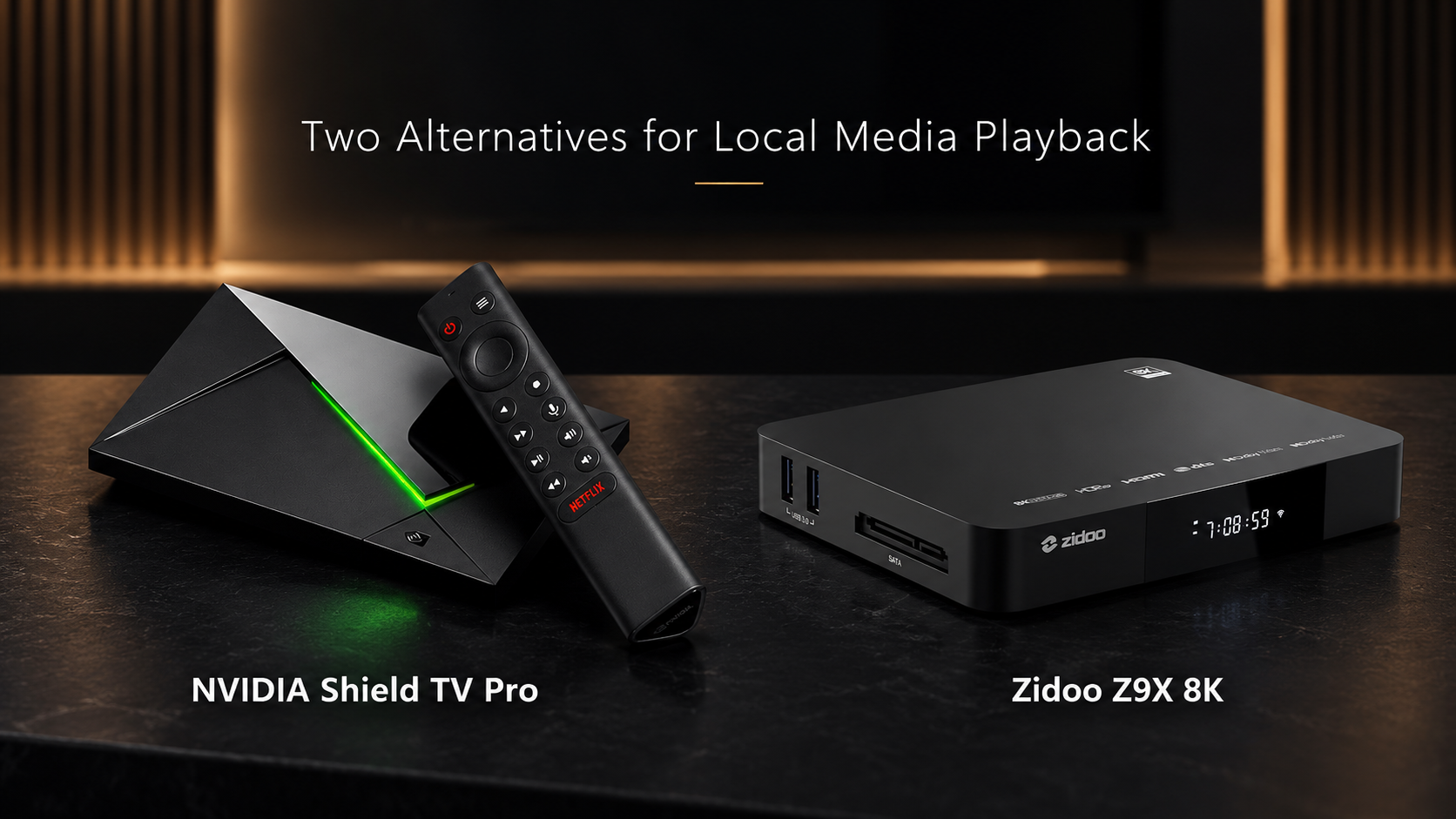
The NVIDIA Shield TV Pro is an interesting example of a device that continues to offer something Apple has chosen not to prioritize.
Originally released in 2019, the Shield is far from new.
Yet it remains a worthwhile option for enthusiasts using Plex, Kodi, and other applications to access locally stored movie libraries.
One important reason is its support for passthrough of Dolby TrueHD, DTS-HD Master Audio, Dolby Atmos, and DTS through compatible applications and playback equipment.
That allows a capable AV receiver or processor to receive supported original encoded soundtracks.
The Shield also supports Dolby Vision, HDR10, and NVIDIA's AI-enhanced upscaling.
But there are compromises.
It lacks HDR10+ support, its processor and connectivity are aging, and its software experience may not feel as polished or consistent as Apple's.
I wouldn't automatically recommend purchasing one over an Apple TV if the primary use is Netflix, Disney+, or other mainstream streaming applications.
But for someone maintaining a large collection of digital movie files with lossless soundtracks, the Shield remains relevant.
The fact that a device introduced in 2019 still offers an audio capability absent from Apple's newest hardware is noteworthy.
Zidoo Z9X 8K: Built for Local Movie Libraries
Another interesting alternative is the Zidoo Z9X 8K.
Unlike Apple TV, Zidoo focuses heavily on high-quality local media playback.
It supports Dolby Vision, HDR10+, AV1 decoding, and video output capabilities extending beyond the 4K/60 fps limit of Apple's streaming devices.
It also supports lossless multichannel audio formats, including Dolby TrueHD Atmos, through compatible playback configurations.
For enthusiasts storing movie files on a NAS or external drive, those features can make it a particularly appealing choice.
Zidoo also emphasizes media library organization, allowing users to browse their movie collections through a visually oriented interface.
However, it's important to understand what the Zidoo isn't.
It shouldn't be considered a direct replacement for Apple TV if your primary goal is accessing every mainstream subscription streaming service.
Its strength is specialized local playback rather than providing the same broad, convenient streaming ecosystem Apple offers.
And that specialization isn't necessarily a disadvantage.
A device designed specifically for high-quality local movie playback may be better suited to that purpose than an entertainment hub intended to serve everyone.
Kaleidescape Strato K: Where I Personally Want to Go Next
This brings me to the direction I'm considering for my own home theater.
Kaleidescape.
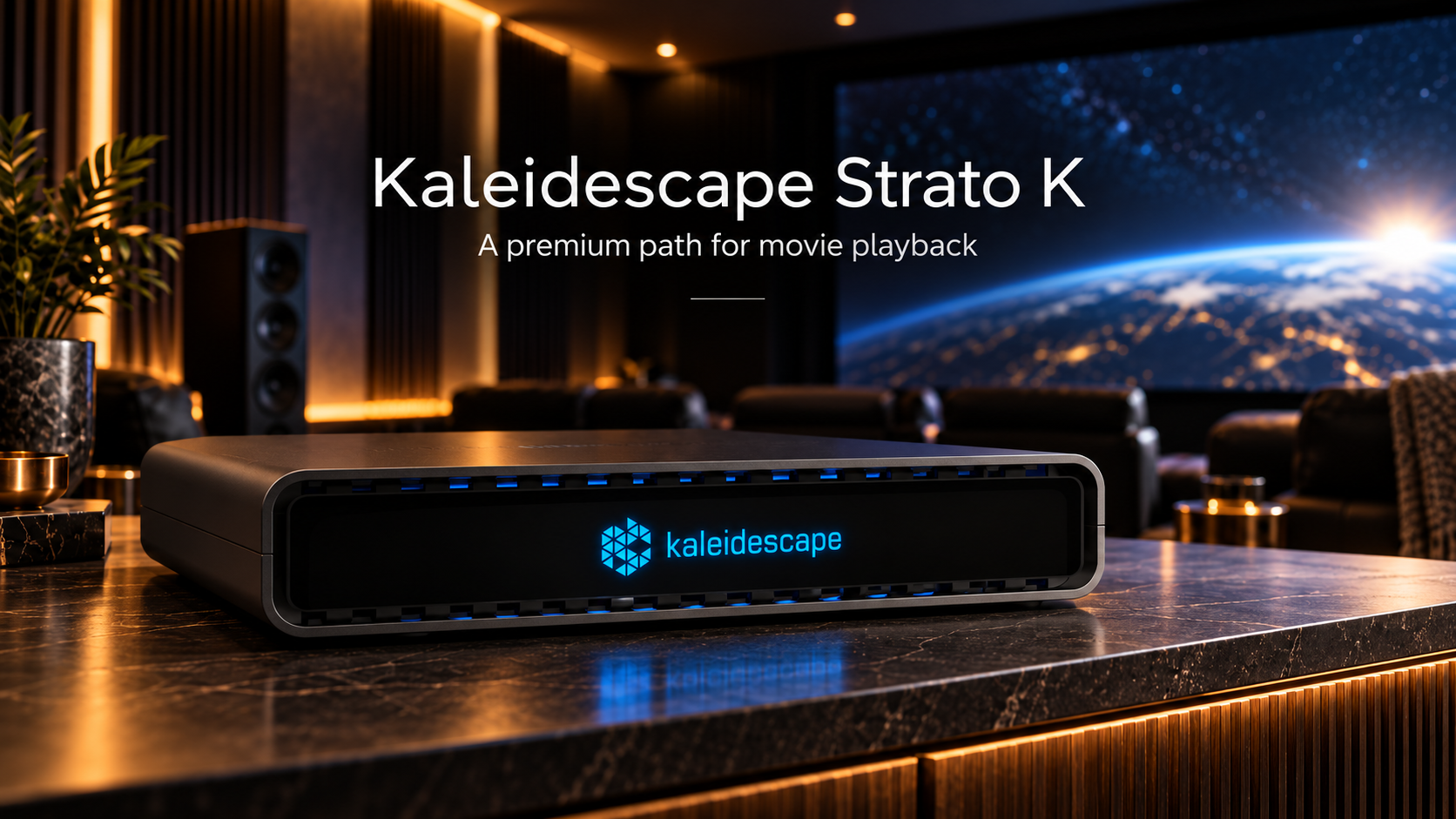
And specifically, its new flagship Strato K movie player.
Introduced in June 2026, the $4,995 Strato K represents a fundamentally different approach to movie playback than conventional streaming boxes.
Rather than focusing on artificial intelligence, gaming, or smart home integration, Kaleidescape has concentrated on improving the quality of the movie experience itself.
The Strato K supports native 8K playback, lossless Dolby Atmos and DTS audio, and Kaleidescape's new 4K Cinematic format.
That last feature is particularly interesting.
4K Cinematic offers significantly higher video bitrates and up to full 4:4:4 chroma sampling, preserving additional color information compared with conventional 4K delivery formats.
Whether those differences translate into visible improvements will depend on the content and display, but the technology is clearly aimed at enthusiasts seeking greater video fidelity.
The Strato K also provides 960GB of internal solid-state storage and can operate independently or as part of a larger Kaleidescape system.
At $4,995, it isn't inexpensive. Kaleidescape's earlier Strato V remains available at $3,995, delivering excellent 4K Dolby Vision playback and lossless audio without the new 4K Cinematic or native 8K capabilities.
But for someone looking to invest in a premium movie player for the long term, the additional $1,000 is worth serious consideration.
And that brings me back to my own decision.
I'm keeping my existing Apple TV 4K for everyday streaming.
When I'm ready to make my next significant investment in movie playback, I'd rather put that money toward a Kaleidescape Strato K, where the improvements are focused on the qualities I value most: picture and sound fidelity.
It's a considerably larger investment than purchasing another Apple TV, but it's also an investment in a different kind of movie-watching experience.
Sometimes the Best Alternative Is the Apple TV You Already Own
There's another option that deserves serious consideration.
Do nothing.
If you already own the third-generation Apple TV 4K and primarily use it for Netflix, Apple TV, Disney+, YouTube, or other conventional streaming services, your existing device remains highly capable.
It already supports the major HDR formats, Dolby Atmos from compatible streaming applications, and 4K video at up to 60 frames per second.
The interface is responsive, the app ecosystem is mature, and integration with other Apple products remains one of its strongest advantages.
Interestingly, Apple is also bringing Siri AI to compatible older Apple TV 4K models, beginning with the second generation.
That means some of the new software functionality won't require purchasing the latest hardware, although features such as built-in far-field microphones and four-HomePod surround sound remain tied to the new device.
For existing owners, the practical question becomes straightforward.
Does the fourth-generation Apple TV offer something you'll actually use that your current model cannot provide?
If the answer is no, there's little reason to upgrade simply because a newer version exists.
What About Buying the Previous Generation?
For someone purchasing an Apple TV for the first time, the outgoing third-generation model could also represent a good value.
It originally launched at $129 for the 64GB Wi-Fi version and $149 for the 128GB Wi-Fi and Ethernet configuration.
Those original prices aren't necessarily representative of today's remaining inventory, so shopping carefully matters.
A discounted third-generation unit could be a sensible purchase, particularly if you don't need gaming enhancements, the latest HomePod features, or the additional processing power.
I would, however, avoid paying close to the new model's $299 price for older hardware.
The fourth-generation device offers a newer processor, updated connectivity, AV1 decoding, and potentially more years of software support.
Those advantages have value, even if they don't immediately improve conventional movie playback.
The key is the price difference.
If you can obtain the third-generation model at a substantial discount, it may be the smarter financial decision.
If the prices are close, the newer device becomes easier to justify.
And if you already own a third-generation Apple TV that's working perfectly?
You may not need to spend anything.
Which Media Player Makes the Most Sense?
There isn't one universally correct answer.
The best player depends on what you watch, where your movies come from, and which capabilities matter most.
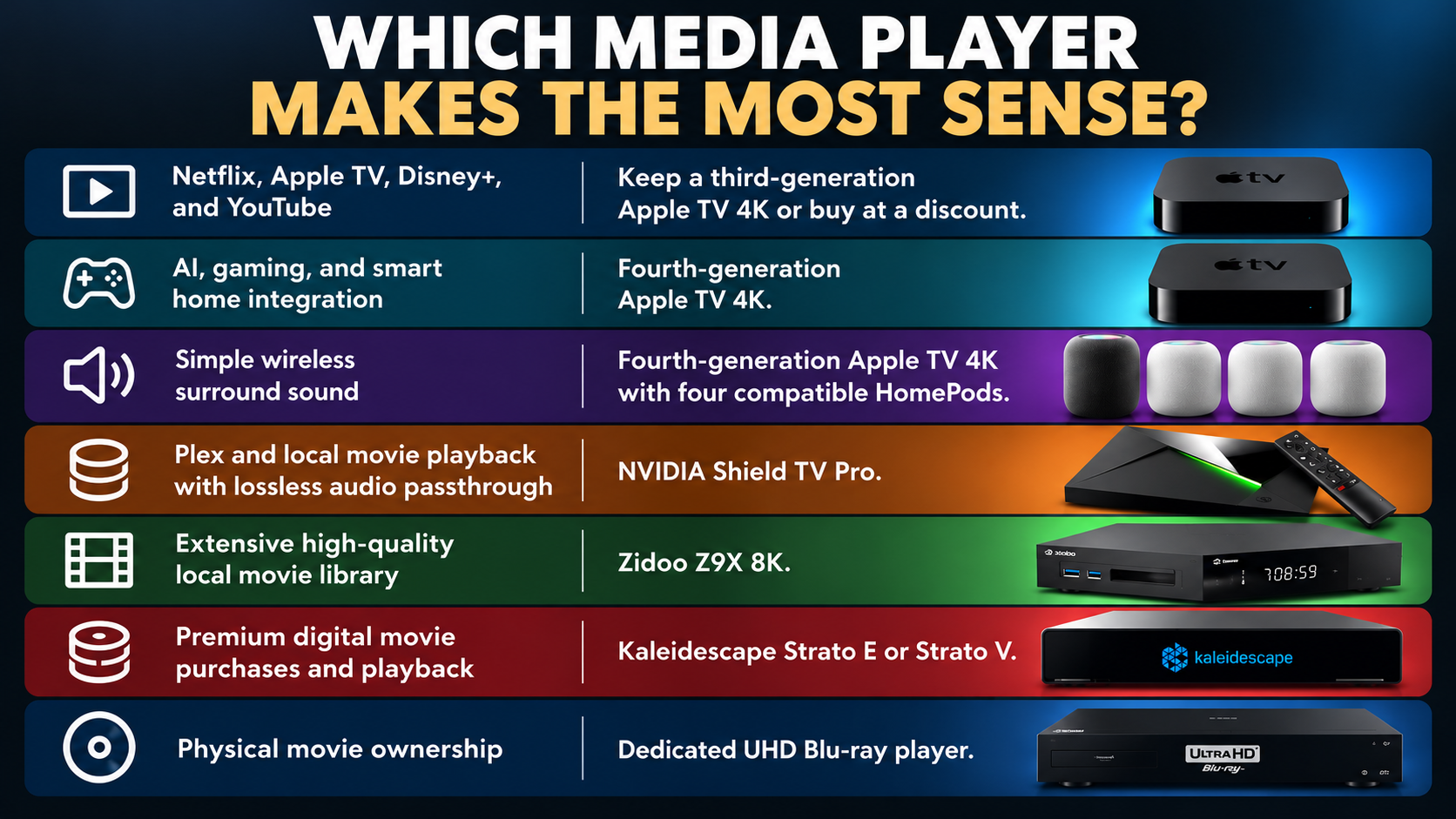
It's also worth recognizing that these products don't necessarily compete directly.
An Apple TV can remain the everyday streaming device while a Zidoo handles a local movie library.
Someone else might prefer Apple TV for subscription streaming and Kaleidescape for dedicated movie nights.
And for enthusiasts who enjoy physical media, a quality UHD Blu-ray player remains an excellent option.
There's nothing wrong with using different devices for different purposes.
In fact, that may be a better approach than expecting a single streaming box to deliver every conceivable feature.
Final Thoughts: The First Apple TV Upgrade I'm Skipping
After owning every generation of Apple TV, this is the first release I have no intention of purchasing.
That isn't a criticism of everything Apple has accomplished.
The new four-HomePod surround sound system is genuinely interesting, particularly for people who want a more immersive home entertainment experience without the complexity of a traditional surround system.
The A19 processor, AV1 decoding, and improved Siri capabilities are also meaningful enhancements for the right audience.
But they aren't meaningful enough for me.
My current Apple TV 4K already delivers an excellent experience with the streaming services I regularly use.
And when I look at what I'd like to improve next, it isn't gaming performance, hands-free voice interaction, or artificial intelligence.
It's movie playback fidelity.
That's why I plan to keep my existing Apple TV for conventional streaming and eventually invest in Kaleidescape for dedicated movie viewing.
It's a considerably more expensive direction, but one that better aligns with what I value in my home theater.
And perhaps that's the real takeaway from Apple's latest announcement.
The best upgrade isn't necessarily the newest device. It's the one that meaningfully improves how you experience your movies and music.
For the first time, Apple's newest streaming box doesn't offer enough to justify replacing the one I already own.
And I'm perfectly comfortable sitting this generation out.
What about you?
Are you planning to upgrade to the fourth-generation Apple TV 4K, or will you keep your existing model?
If you've invested in a dedicated home theater, does lossless audio passthrough influence your choice of media player?
We'd love to hear what you're using and whether you've considered alternatives such as NVIDIA Shield, Zidoo, Kaleidescape, or a dedicated UHD Blu-ray player.
References and Further Reading
Apple: Apple unveils the fourth-generation Apple TV 4K, October 13, 2026.
https://www.apple.com/newsroom/2026/10/apple-unveils-the-new-apple-tv-4k/
Apple: Fourth-generation Apple TV 4K technical specifications.
https://www.apple.com/ca/apple-tv-4k/specs/
Apple: Third-generation Apple TV 4K announcement and original pricing.
https://www.apple.com/newsroom/2022/10/apple-introduces-the-powerful-next-generation-apple-tv-4k/
Firecore: Discussion of TrueHD Atmos limitations when using Infuse on Apple TV.
https://community.firecore.com/t/true-hd-atmos-as-pcm-stereo-instead-of-multichannel/39931/31
NVIDIA: Shield TV Pro specifications and supported audio formats.
https://www.nvidia.com/en-us/shield/shield-tv-pro/
Zidoo: Z9X 8K official technical specifications.
https://www.zidoo.tv/Product/spec/model/Z9X%2B8K/target/UXVVvon%5Bld%5DQlVKKmVViAFMcQ%3D%3D.html
Kaleidescape: Strato K official product details and pricing.


Comments ()